Mobapad M12-S Review
Bigger and better.
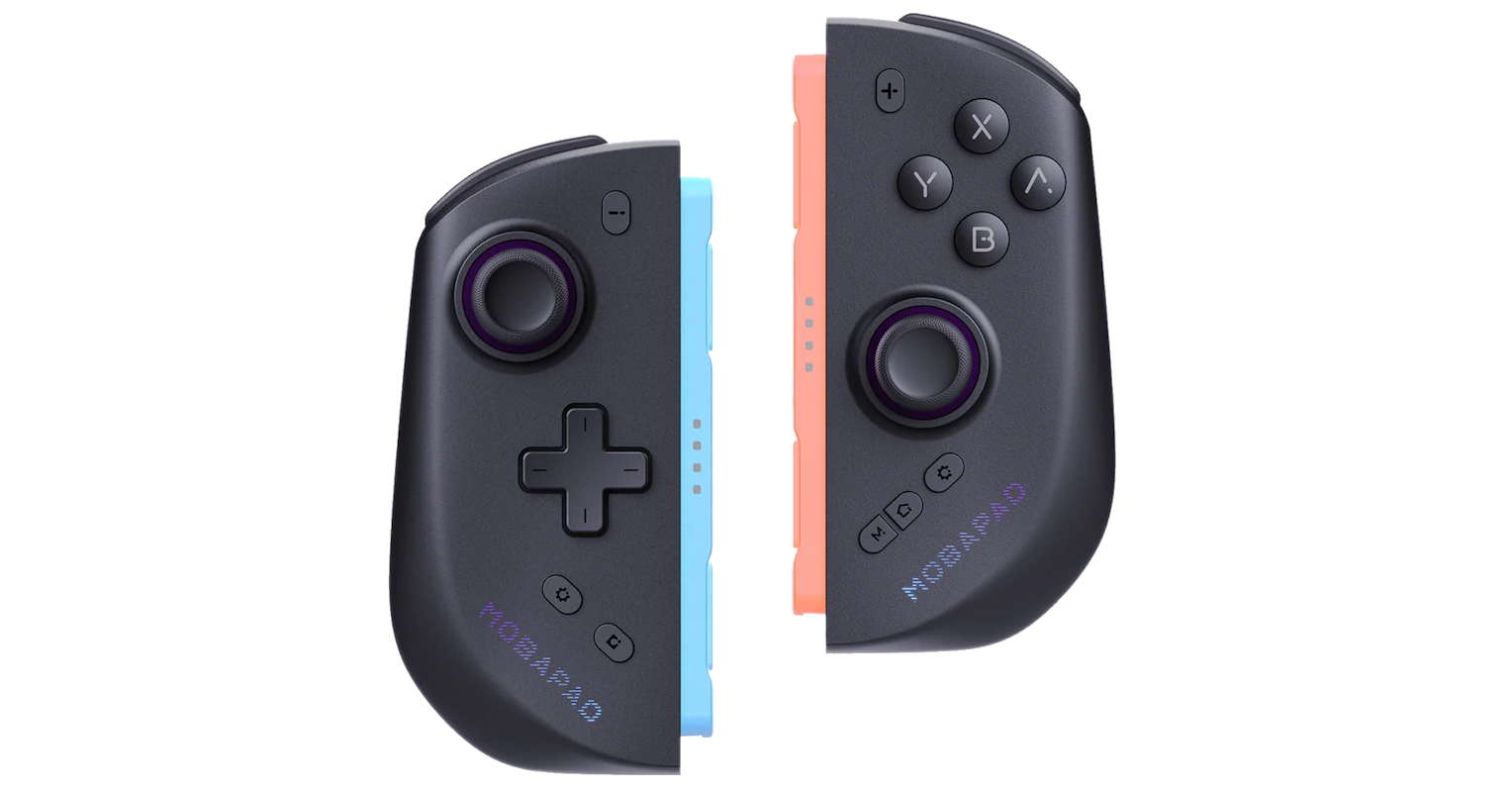
Following my recent IINE Twin Lumina review, Mobapad was kind enough to send over one of their M12-S units for me to take a look at. I was a big fan of these when I first saw them, so it was exciting to get the opportunity to try one of their products out. I don’t have much experience with Mobapad, who is mainly a Switch accessory manufacturer as opposed to IINE, so they are super dialed-in when it comes to making great controllers for the Switch specifically.
The M12-S was the second Joy-Con 2 alternative (just after the NYXI Hyperion 3), so I wanted to make sure I covered the pros and cons of their offering since I had already looked at the Twin Lumina last month.
Thanks again to Mobapad for providing the unit for this review! And an apology for taking so long to get this review out, as it was originally intended to go up in September.
 Mobapad’s M12-S is a premium Joy-Con 2 replacement packed full of features.
First Impressions
There’s not much to the contents of the box, though all of the packaging is super high-quality:
- M12-S controllers
- Controller case
- Instruction card
These controllers are very nicely made. I love just holding them in my hand, and carrying the console in handheld mode with them connected; the color-matching on the grey model makes the Switch 2 feel like a bigger, premium handheld, and I’m honestly getting some shades of something like the Lenovo Legion Go in the overall vibe.
One thing I quite like is that Mobapad has obeyed Nintendo’s design language for the connectors; blue for left, and red for right. They feel right at home with my other controllers, like they belong with the console.
I was slightly disappointed to find out that Mobapad did not include a bridge with these controllers. Although I wasn’t expecting one with the IINE Twin Lumina (and occasionally used theirs while testing in docked mode with the M12-S), it would have likely prevented some of the comfort issues I’ll talk about later. -2
 Great feel in the hand due to the grip stippling texture
Controller Feel and Build Quality
The controllers themselves are built perfectly; I’m a huge fan of the finish across the whole controller, which has that sort of matte, ‘new plastic’ feel you can feel on a fresh Nintendo console. The M12-S doesn’t have any rubber or anything going on outside of the joysticks, so it’s a uniform texture across the whole unit.
Full disclosure: I have short fingers. I rarely enjoy gigantic consoles or controllers because of this, as it makes it a bit difficult to accurately reach the controls. I don’t believe that the M12-S suffers because the controls are hard to reach, but moreso because the shape of the controllers themselves put my hands at odds with my wrists. I want to hold them more inclined—like is shown with their angled controller bridge—but when in handheld mode or connected to the only bridge that I own, this isn’t possible. It’s not a huge discomfort, but it is definitely notable. -3
 The ABXY and d-pad feel nice and tactile, like a mouse or MX Blue keyboard switch
Controls
Mobapad has hit it out of the park with this one, genuinely. Whenever I use the M12-S, I feel like I can almost completely ignore the controllers in my hands and just play. The sticks glide nicely (it’s literally in the name—TMR glide!) and feel so snappy in 3D games.
The buttons are quite similar to some other offerings like the Twin Lumina, which was a bit of a surprise to me; they use what feel almost like clicky switches (think mechanical keyboard) rather than using rubber membranes like most retro handhelds do. They are probably micro-switches underneath, but don’t have that hard, flat breakpoint like the regular Joy-Cons do, as a for-instance. I’ve not had many controllers that feel like this, but these feel really premium. The travel is fine-tuned, and I love the tactile feedback I get from them.
One gripe I do have concerns the function keys at the bottom of the controller, including the home button and the macro key. These buttons are very small and grouped close together, which makes it hard to press them intentionally without pausing to look down at what you’re trying to hit. Spacing these buttons out would have really helped, here. -3
Handheld mode is obviously the target of these Joy-Con 2 replacement options: Holding the Switch 2 with the M12-S attached really elevates the overall ergonomics of the console as a singular unit, without the need for an oversized shell like you might find on offerings like the CRKD Nitro Deck. The Joy-Con 2 just don’t cut it for how big the Switch 2 is; and I feel like the M12-S really covers that gap in their stead.
Latency and Responsiveness
For testing I mainly played Metroid: Dread, Mario Kart World, Super Smash Bros. Ultimate, and Star Fox. Notedly absent was an RPG (which is kind of rare for me), where I would likely want to swap out the dish-pad for the traditional d-pad, but Fire Emblem: Fortune’s Weave released in the midst of my writing and allowed me to test out the functionality of both pads.
There were no latency problems to note, and the controller was perfectly responsive to all inputs. It especially felt good in Metroid: Dread, where there were lots of back-and-forth movements on the d-pad; the tactile feedback here really makes it clear what inputs I’m hitting.
Star Fox was where I put the analog sticks to the test, and they hold up very nicely. They use TMR glide sticks for the M12-S, which are undeniably some of the nicest I’ve ever used before, and are a certain upgrade from any other controller offering from Nintendo. The deadzones are nicely configured, and I never feel like I’m overcompensating for an input.

Compatibility and Connectivity
There are no major issues to report here in terms of connectivity; these are going to function almost exactly like you’re used to with other Joy-Con and their alternatives.
A big thing worth noting here is that the M12-S does not feature any NFC, HD rumble, or mouse mode sensors from the Joy-Con 2. That’s a significant reduction in functionality, though the M12 is clearly being positioned less as a replacement for the Joy-Con’s functionality, and more as an overall controller for core game playing. I personally don’t use amiibo or mouse mode, though the HD rumble would definitely have been welcome as some of the games I play do make use of it. The price tag is a $20 undercut from the Joy-Con 2, though, so it’s not like I can take points away here (And for fairness, I did not take any away from IINE for the Twin Lumina, either).
For maintenance and configuration, the Mobapad app is about as easy to use as you could imagine: Simply pair each controller individually via Bluetooth, and update via your phone’s internet. Macros and lights are super easy to customize through this app as well, instead of worrying about complicated button combos and macro timing.
You can still use button combos for macro recording, however, and it is definitely worth noting here: I thought I was losing my mind when my Switch 2 started putting in seemingly random inputs all on its own. It took an embarrassing amount of time for me to figure out that I had accidentally recorded half a Smash Ultimate match worth of inputs that were playing back on the home menu. I must have hit the macro button by accident during the match.
 I added this third-party bridge to make using the M12-S a little easier for me.
Final Thoughts
As the first Mobapad product I’ve ever looked at, this thing means serious business. The fit and finish on the M12-S is just stellar; my Switch 2 feels like a much more premium console—more akin to the high-end x86 handheld sector—than the regular old Joy-Con 2 provides. The features here are fantastic, and even if the comfort isn’t perfect for my hands I can definitely feel a stark difference for the better vs. the stock console.
You can purchase Mobapad’s M12-S, as well as the M12-HD (which supports NFC and HD rumble) from Mobapad’s store, linked below. The M12-S run for $79.99 USD, or $95.99 with the charging bridge. A carrying case for the controllers connected to the console is also offered separately by Mobapad for portable compatibility.
If you are willing to compromise on the Switch 2 features that the M12-S lacks, it is a great purchase!
Final Score: 92 / 100
Purchase the Mobapad M12-S here
This product was provided by Mobapad for review.
If you’d like me to review a product, email me: me@jaw.fyi