IINE Twin Lumina Review
Light Work for IINE.
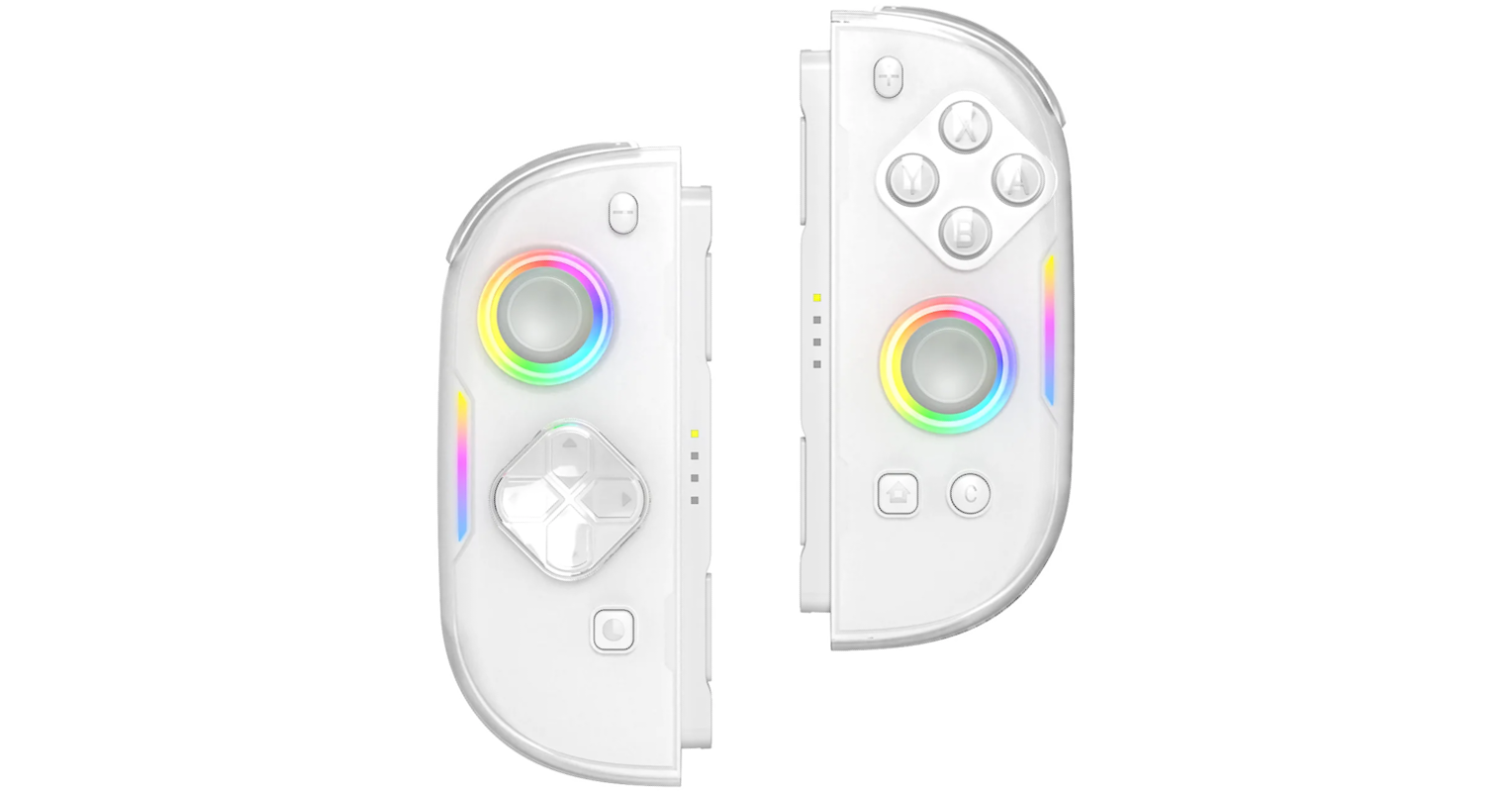
IINE continues to impress me with just how well-rounded each of their new releases is. I’ve covered the (link) Chronos already, and have plans in talking about their Ananke in a future post, but I currently am on a deep-dive into the world of Joy-Con 2 alternatives. IINE was kind enough to send me a review model of the Twin Lumina which was released in July as a young blogger, and I definitely want to shout them out for powering this review.
To give a little bit of background on the topic, the Switch 2 currently has three major alternatives to its stock, split controllers for handheld players: The NYXI Hyperion 3, the Mobapad M12 models, and the Twin Lumina. I’m going to touch on the Mobapad controller in a future review as well (But not the Hyperion 3, as NYXI’s review unit policy is super predatory), but the focus of this review is all about the Lumina. I want to quickly apologize that this review took so long to get out: I had an impromptu visit to New Orleans at the beginning of the month that delayed me a good bit. I’d planned to have this one done at the end of last month!
 IINE’s Twin Lumina is one of the first offerings hoping to replace your Switch Joy-Con 2.
First Impressions
For someone new to high-end controllers, the Twin Lumina has so far really impressed me from the box onward. It comes solidly packaged; standard fare for IINE, but concise nonetheless. The back has lots of cutaway shots of the controller’s mechanics, and a list of features on the side, ranging from the hall-effect sticks to its smartphone app integration (more on that later). The contents of the box are pretty simple:
- Twin Lumina controllers
- Controller bridge
- Shell/sleeve packaging
- Joystick covers
- Instruction card
The instruction card is a simple bi-fold paper containing hotkeys and setup instructions in both English and Chinese. Since it’s a Joy-Con 2 replacement, most of the pairing instructions and power states are self-explanatory, but there is a good deal of extra functionality for these models that the Joy-Con don’t have. My only issue with the instructions is that it surprisingly does not include any information about the mobile app (although that is incredibly simple to use and entirely self-explanatory). -2
I’m glad that IINE also opted to include a bridge for these controllers, as I ended up doing a lot of my testing in docked mode sitting on the couch. I’ve always personally loved using the Joy-Con separate from the console, so it’s always a nice thing to have with any Switch/Switch 2 controllers.
 Great feel in the hand due to the grip stippling texture.
Controller Feel and Build Quality
The controllers themselves are quite pretty. IINE offers the Twin Lumina exclusively in white, with a construction style they call ‘dual-shot finish,’ which is essentially a white shell with a translucent plastic covering over the top. This gives the controller an icy-looking finish: Normally I would associate this kind of look with cheaper ‘epic’ looking controllers that aren’t actually all that good, but here it is quite a nice aesthetic. The buttons are finished in this style also, while the sticks are solid rubber and the triggers/shoulders are entirely translucent.
LEDs are embedded into the joystick rings, and placed vertically on the side of the controller just beside the d-pad (L) and stick (R). All of the button placements are right where you’d expect, including the SL/SR buttons and pairing buttons on the connectors. In fact, the connectors in their entirety are laid out 1:1 with a real Joy-Con 2, while the main body is a little more spaced out than the Joy-Con 2, with the right stick and d-pad being placed slightly lower than Nintendo’s layout. Also of note are the T/M buttons on the back of both joypads, as well as GR/GL back buttons.
These things feel great in the hand. Whether that’s connected wirelessly or when being used in handheld mode, the Twin Lumina controllers have excellently shaped shells that just feel great to play with. The backs are partially laser-etched with a shallow-but-aggressive gripping surface on the bottom halves. They feel a little bit light for what is intended to be a premium controller, however this is not necessarily a bad thing, as they are lightweight compared to other offerings of the same size. -1
I would like to slightly complain about the bridge that is bundled in: While it is a nice thing to have, I found that in my testing it felt very flimsy when connected to the controllers. You can bend it in your hand without a lot of force. That’s probably fine if you’re gentle with your controllers, but I could definitely see it being a problem for people with a firmer grip while some more playing intense games. -3
 The ABXY and d-pad feel nice and tactile, like a mouse or MX Blue keyboard switch.
Controls
Perhaps obviously, the most important part of a controller lies in the controls. What surprised me about the Twin Lumina was how much I liked the microswitches used by the ABXY and d-pad. Coming chiefly from a stock controller player and a user of many retro handhelds, microswitches are often associated with shallow, clicky controls that don’t have much if any tactile travel. The Twin Lumina switches are quite the opposite, feeling more akin to a computer mouse click than the typical microswitch (like that of the Joy-Con 2).
The sticks are Hall effect, which by now need no introduction. A lot of people were disappointed, or even furious, when Nintendo launched the Switch 2 and its controllers with standard analog sticks instead of Hall or TMR (Tunnel Magnetoresistance) magnet-based controls. Standard controls are prone to drift as the parts wear over time, and almost all of my Switch 1 Joy-Con and Pro Controllers have developed it badly. TMR is currently the newest trend to include in higher-end controllers, but for me Hall is more than enough to escape from the analog hell that Nintendo has had me trapped in for so many years.
The other buttons use more classic microswitches that have a bit of a clunky feeling to them—especially with the triggers—but are not bad by any means. I think I would’ve liked to have the same lightweight-feeling switches as on the ABXY buttons, but it only feels like a loss for the triggers, which don’t give very good tactile feedback. Since the Switch 2 doesn’t feature analog, it likely won’t end up making much difference in most day-to-day usage. -2
The d-pad setup really surprised me. I found it to be not unlike an Xbox-style dish, though more traditionally shaped for my thumb, and difficult to misinput with. In fact, I could say it reminds me of Retroid’s d-pads, which are to date my absolute favorite. Full marks on this one, though I’ll admit I didn’t play as many d-pad centric games as I thought I would over the testing period.
Latency and Responsiveness
I should note right away that I do not have a super empirical testing setup for controllers: I rely more on real-world testing and quick checks with some PC and phone-based tools to make my reviews. I am always trying to improve my setups, though, so let me know if there’s any information missing here!
There is no significant input delay to report with the Twin Lumina on any level. The buttons and sticks feel particularly responsive, and the pairing process is smooth on every platform I have attempted to connect them to. Of note, you can only pair one half to IINE’s mobile app at a time, meaning that both controllers must be set up and updated individually.
I mostly played Mario Kart World, Elliot: The Millenium Tales, Super Smash Bros. Ultimate, and Triangle Strategy during my testing. At no point in the testing period did I feel like any inputs made had occurred through any fault but my own.

Compatibility and Connectivity
Another shorter section as the Twin Lumina excels in this department. With full Switch 2 compatibility, the controllers are as easy to pair as snapping to the console, or pairing not unlike regular Joy-Con.
My only major gripe with the connectivity aspect on Switch 2 is that not all of the buttons are capable of connecting the controllers. With my Joy-Con, I tend to simply hold down L and R, or A and d-pad right when turning the controllers on when not connected directly to the console. The only buttons on the Twin Lumina that are capable of this are the pairing buttons on the side, or alternatively the home and screen capture buttons. It’s not a major thing, but it is probably the most inconvenient thing I found about the controller during testing. -3
Pairing the controllers to the mobile app is easy, and I was able to update the firmware for both in less than 10 seconds each. From there all the aspects of the controller can be set or customized without needing the complicated button input combos that many other controllers are locked to. There are turbo and macro options (the T and M buttons on the back, as well as the GL/GR buttons) and remappings available, which prove incredibly useful for games with static controls.

Final Thoughts
The Twin Lumina are one of the finer IINE offerings I have tested. This company keeps me coming back for more, and I’m ecstatic that I’m able to rely on them as often as I do. These controllers have slight flaws, but I would not hesitate to recommend them, especially for someone who tends to use the Switch 2 more like a handheld than a home console.
The Twin Lumina are available from IINE for $79.99 USD. By using my affiliate link and code tobographic at checkout, you can save 3% to bring the total down to $77.59. It is worth noting that IINE also offers a Switch 2 carrying case designed for the Twin Lumina (since existing cases are usually too small to accommodate the wider controllers) as well as a bundle with the controller that ships for free.
Overall, the Twin Lumina are a great option for any Switch 2 owner. Buy with confidence!
Final Score: 89 / 100
Purchase the Twin Lumina here (affiliate)
Discount code: tobographic (3% off)
The Twin Lumina was provided by IINE for review.
If you’d like me to review a product, email me: me@jaw.fyi